
Connection Pooling: Fundamentals, Challenges and Trade-offs
How to handle 10,000 concurrent requests without crashing your database

Database integration is easy until your application receives thousands of concurrent requests. Your application can horizontally scale and handle spike in user requests, but the database like PostgreSQL, or MySQL would struggle to do so.
Under the hood, your application uses a TCP connection to connect to the database. A spike in the number of connections would overwhelm the database and slow down the query execution.
Connection pooling solves this by maintaining a pool of reusable connections. While the concept appears simple, there’s complex engineering behind an effective connection pool implementation.
In this article, we will dive deep and understand how connection pooling works. We will explore the different challenges that a connection pooling library tackles and common trade-offs that engineers make while using a connection pool.
With that, let’s see what happens under the hood when your application executes a query.
Query Execution
Let’s assume that your system stores users in a relational database like PostgreSQL and exposes an API to fetch user information. Your application will execute the query - Select * from users where userId = 30 to fetch the user information.
The below diagram illustrates the database connection establishment that happens before your application executes any query.
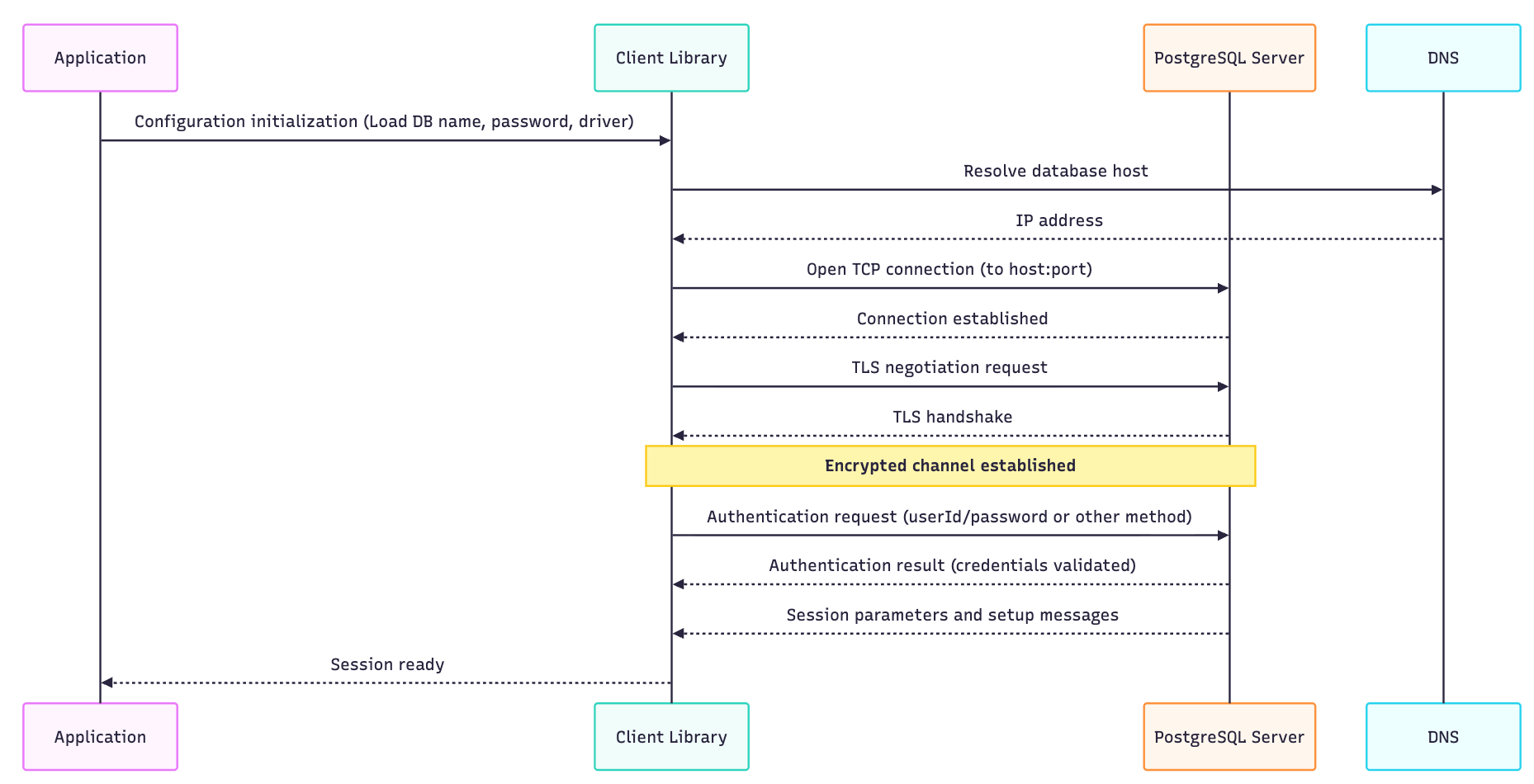
The connection establishment can take anywhere between 20-50 ms and 200+ ms if the database is in a different region.
With this setup, what would happen if the clients make multiple API calls to fetch different users?
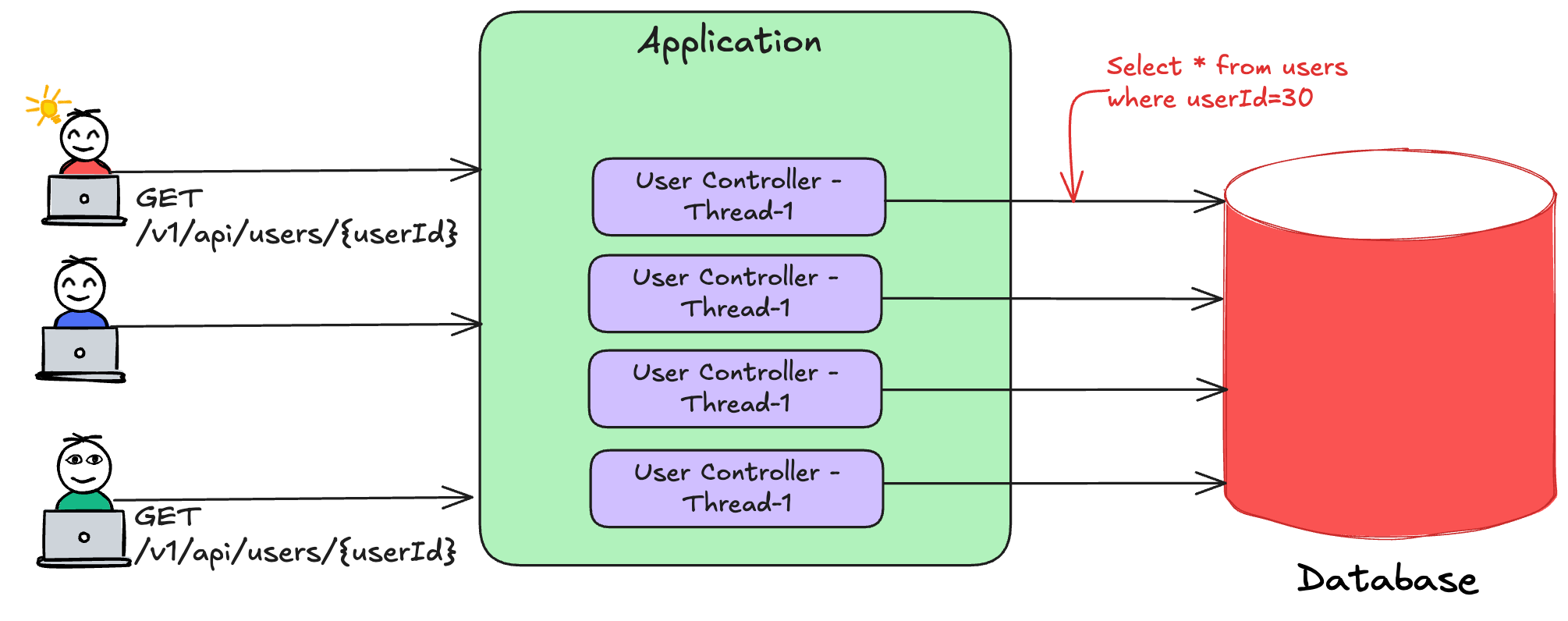
Here’s what would happen for every API call:-
The application would create a database connection.
It would use the connection and send the SQL query.
Get and process the results of the SQL query and send the data back to the client.
The below diagram shows how the application would create a connection for every API call.
While the above setup may work for 100-200 requests per second, do you think it would handle 10K or 100K requests?
Let’s explore in the next section the ways in which the system would break.
Database limitations
Let’s evaluate the impact on scalability, resource utilisation and performance.
Scalability
If the system receives 10K RPS (requests per second), it would make equal number of connections to the database. Most of the databases are not optimized to handle 10K simultaneous connections. For eg:- PostgreSQL sets default max value of connections to 100 (can be increased).
This would result in connection throttling and database would return an error like “sorry, too many clients already“.
Resource utilisation
At 10K RPS, the CPU utilisation would spike to handle large number of TCP connections. It would also increase the context switching and potential network-level throttling.
Every connection also consumes memory and it would increase the chances of memory exhaustion in database.
Performance
Every connection setup would add 20-50 ms to the latency. Further, resource exhaustion would slow down the queries and increase the API latency. The slowness would degrade the user experience.
As a result, the database becomes a bottleneck when a connection is created for every request. Let’s now see ways to overcome this bottleneck through Connection Pooling.
Connection Pooling
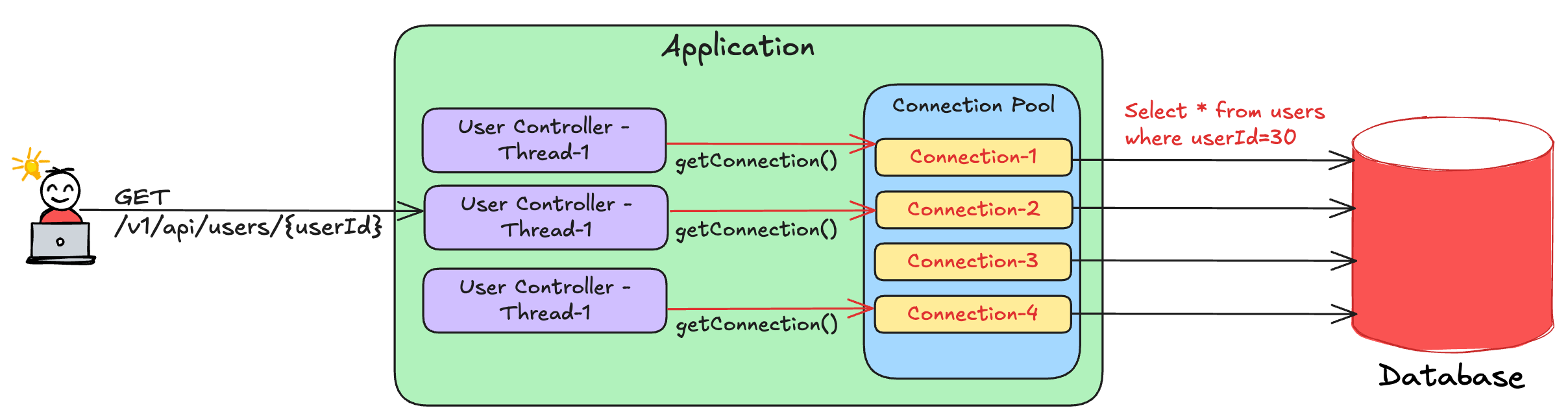
A connection pool is a collection of pre-established database connections that an application can reuse. Here’s how an application creates and uses the connection pool:
During the application startup, the application creates pre-defined number of database connections.
The connections are then stored in a data structure for future use.
If an application thread wants to execute a query, it would borrow one connection, use it for query execution and return it back to the pool after completion.
In case all the connections are exhausted, the thread waits until a connection becomes available and then continue its execution.
The below diagram describes how a connection pool works.
Here’s sample Java code that illustrates how connection pool is used by an application.
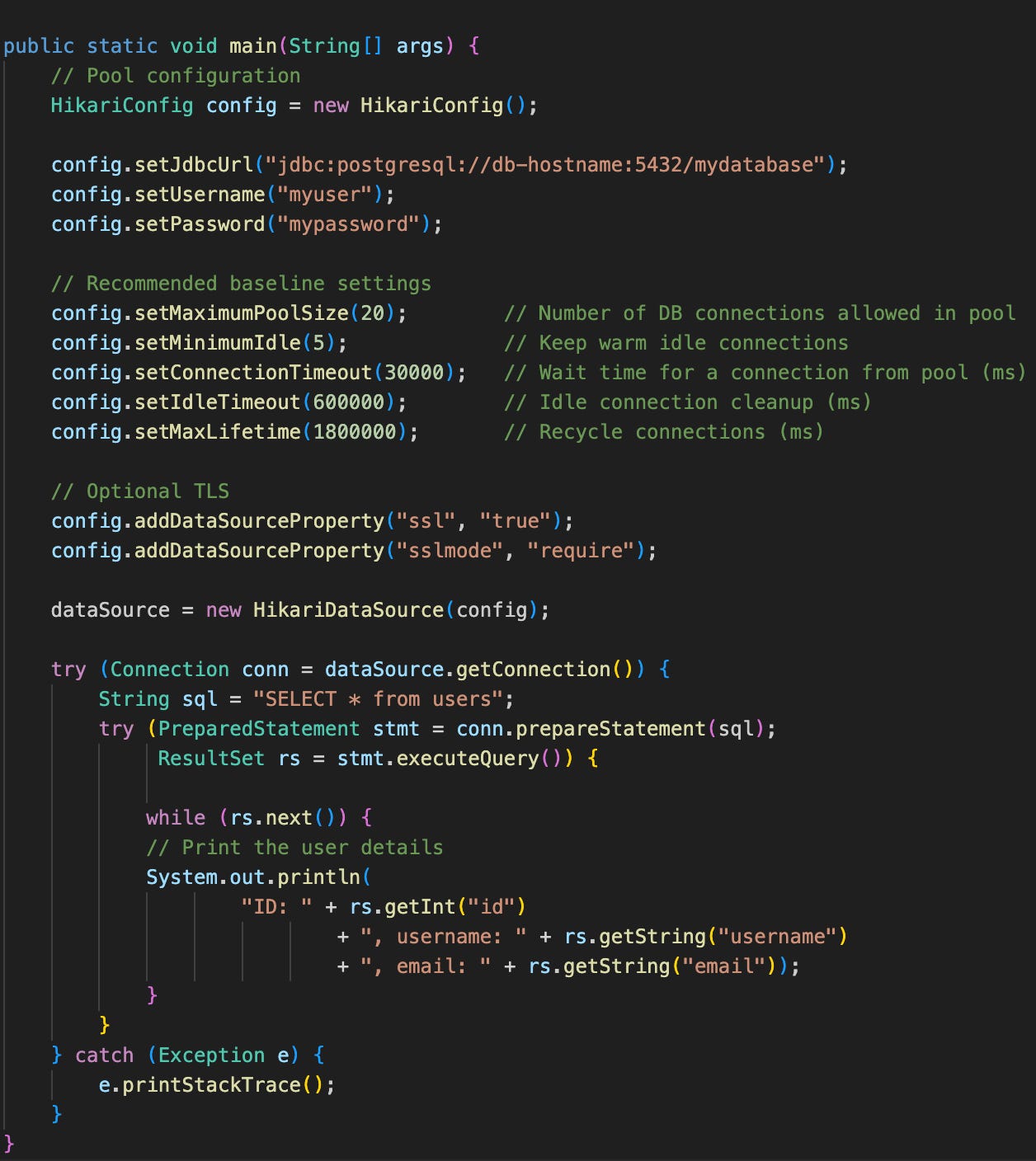
The above code uses a popular library named Hikari-CP in Java. As seen in the code, it first initializes the pool’s configuration using parameters such as maximum pool size, idle connection count, etc and then fetches the connection.
With the above approach, the connection pool ensures:
Scalability - The database is not overwhelmed with large number of connections preventing connection throttling.
Resource utilization - Since the number of connections are limited, it optimally uses resources such as memory, network and CPU.
Performance - The connection creation overhead is eliminated and thus can save 20-50 ms for every query execution. Further, limited connections exert less pressure on the database ensuring predictable performance.
The Biggest Black Friday Deal for Developers Is LIVE!
Educative just launched their Black Friday + Cyber Monday sale, and it’s hands down their best offer of the entire year.

Look no further than Educative.io’s course on Grokking the System Design Interview. You can use this link to get an additional 10% off.
Pool-size Trade-offs
One question that puzzles most developers is What should be the right pool size? When I first used a connection pool, it took me several weeks of tuning to get the correct pool size.
Here’s why getting the right pool size is a tough nut to crack:
Small pool size - Small size implies few connections and less database resources. With request spike, waiting time increases for additional requests slowing down the execution.
Large pool size - Large pool size are reliable to handle a sudden spike in the load without degrading the performance. However, it wastes resources if the workload has low volume.
There’s a resource-performance trade-off and developers need to strike a right balance between the two.
Instead of blindly setting the pool size, one can follow the following approach:
Start with a small pool size (20-30 connections).
Load test with real traffic and observe the impact on metrics such as database CPU, memory, wait time, request latency, etc
Experiment with different number of connections and observe the impact on the metrics.
Keep a buffer of 15-20% above peak usage while setting the maximum pool size.
At times, it helps to have multiple pools with each catered for a different workload pattern. For eg:- A small pool for low-volume traffic and a large pool for high-volume traffic.
Now that you understand the trade-offs, let’s uncover the challenges behind building a connection pool.
Challenges
The connection pool’s dataSource.getConnection() abstracts most of the complexity from the users. It hides all the challenging semantics related to concurrency, database driver and network.
Building a connection pool library from scratch is exciting and equally gruelling task for a developer. Unlike usual programming task, it involves design considerations such as:
High-performance - It must be able to handle multiple concurrent calls with low contention. Best libraries often leverage lock-free data structure to achieve the same.
Zero-overhead - Connection creation is an expensive process and results in a performance penalty. Hence, the library must ensure it returns live connections.
Simple and flexible - The interface must be simple to use and easily configurable through parameter tuning.
If you want to learn more about connection pooling, you can go through the code of one of the open source libraries. Personally, I would recommend navigating HikariCP’s code.
Moreover, if you are learning a new language like Rust, you can build a connection pooling library from scratch and then experiment with it.
So far, we considered a single application instance using a connection pool for our understanding. In case there are 10x instances, wouldn’t the number of database connections also 10x? 🤔
Wouldn’t the database get overwhelmed this time again? 🤔 If yes, how can we solve this? Leave your thoughts in the comments below. We’ll take up this question in the next article on database proxies.
Before you go:
❤️ the story and follow the newsletter for more such articles
Your support helps keep this newsletter free and fuels future content. Consider a small donation to show your appreciation here - Paypal Donate
I’m thinking one way we can avoid the database getting overwhelmed when we have, say, 10x instances, is to put a layer between the database and the 10x instances. Textbook microservice architecture of one microservice per database can be useful here. We can then make sure the number of instances of that microservice sitting right in front of the database is controlled and tuned to fit the performance need. Would love to hear more ideas!