
How Distributed Systems Store Files: Databases, Object Storage, and the Trade-offs
From database BLOBs to object stores — understanding the architecture patterns and when to use each

What’s the right approach for storing a file? Should you store it in a database or in a blob storage service like S3? 🤔
A few years ago, I ran into this exact question while designing a file upload service. After weighing the trade-offs, I chose object storage for scalability and cost.
But that decision isn’t always obvious.
Are there cases where storing files directly in the database is actually the better choice? 🤔
In this article, we’ll break down both the approaches, explore their trade-offs, and look at how real systems decide between them.
With that, let’s begin by defining the problem statement for our system.
Problem Statement
We want to build a web application that supports:
File uploads with metadata (title, description, category).
Retrieves recent uploads with image previews.
The diagram below shows the application’s UI screen.

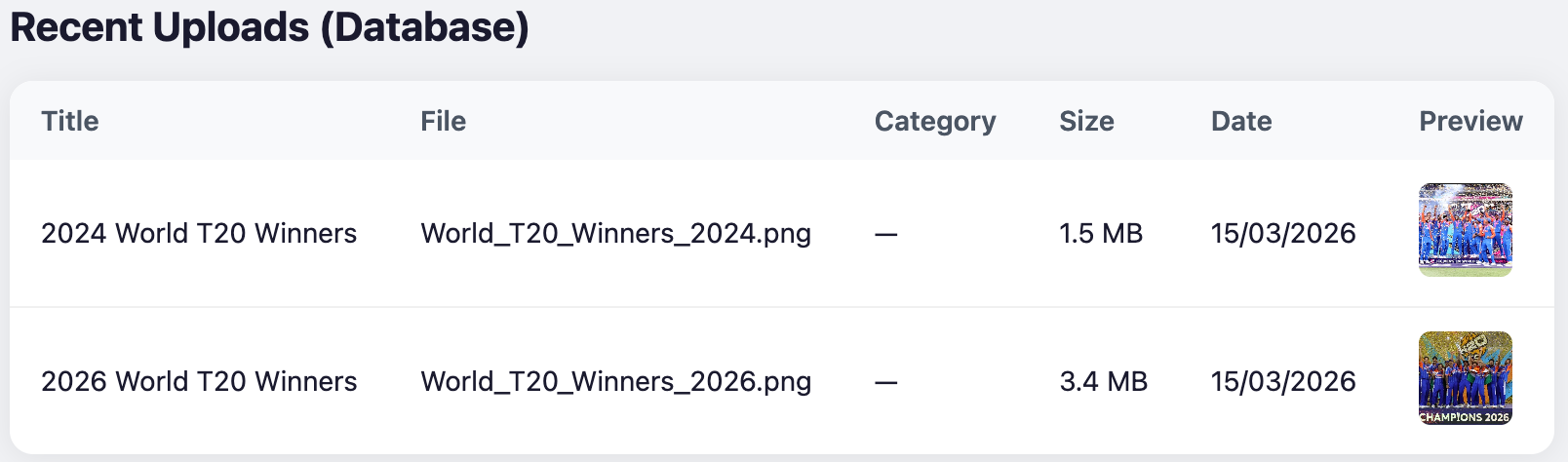
Let’s explore the simplest technique to solve this problem.
Naive Solution - Store files in the database
Most databases can persist files in a binary format. PostgreSQL provides a data type bytea to store raw binary data directly inside the database.
Here’s how you can define a schema with a column to store binary files:
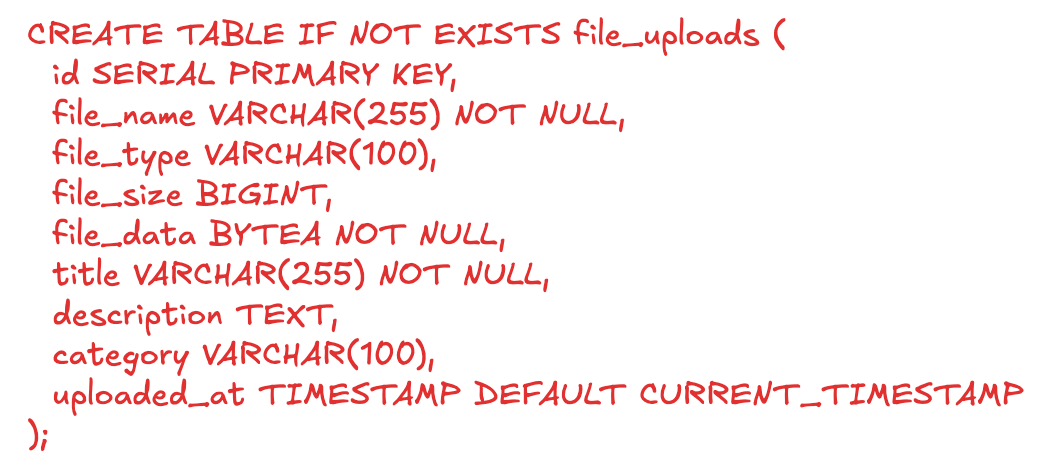
In the above schema, the field file_data will store the binary file data.
Most databases (e.g., PostgreSQL bytea, MySQL BLOB, MongoDB GridFS) support storing binary data directly.
You can use any database of our choice and add backend servers that expose upload and retrieval APIs to build the application.
The diagram below shows the detailed architecture of our system.
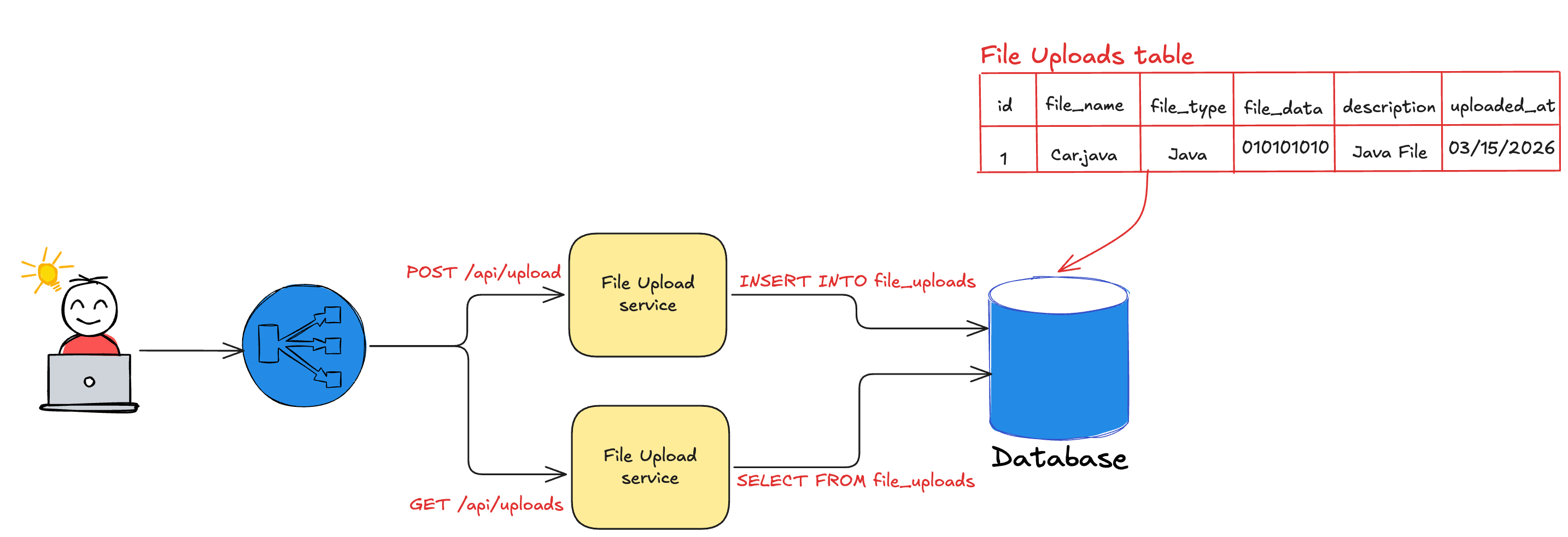
Our solution is simple and easy to manage with less dependencies. This works well for low-traffic, basic use cases.
But, what would happen with more uploads or user growth? Would the system scale? 🤔
Before reading further, take a moment to think what can go wrong while operating the system at scale.
Challenges
Performance bottlenecks: Large binary data increases memory usage, slows queries, and impacts backend throughput.
Backend server performance - With traffic growth, increased memory pressure on backend servers leads to Out of Memory errors leading to unavailability.
Size constraints: Databases impose limits on maximum field sizes. For example: PostgreSQL limits the max field size to 1 GB while MySQL supports 4 GB.
Operational overhead: Replication and backups become slower due to large data volumes.
Cost inefficiency - Databases are 5-20x more expensive for storing large binary objects than blob storage.
We will now see how we can address these challenges through a well-known pattern used in the industry.
Blob storage for file content, Database for metadata
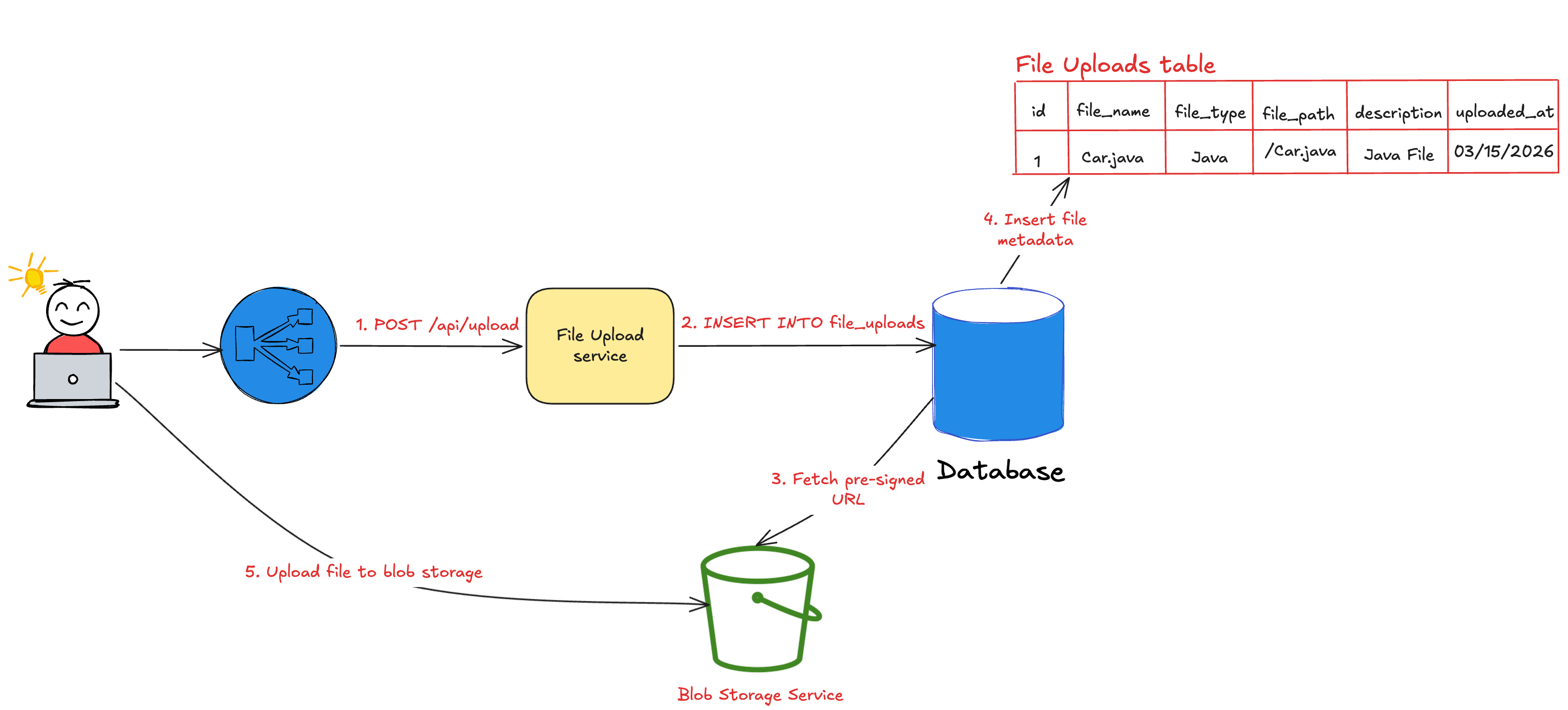
Instead of storing the whole file in the database, we can separate file content from metadata and store them independently. Here’s how we can solve it:
File content - The actual raw binary data can be stored in a blob storage like S3.
File metadata - The attributes(title, description, etc) can be stored in any database along with the reference to the path of the file stored in the blob storage.
We will remove the file_data column from the table and substitute it with file_path column. Here’s the new database schema:
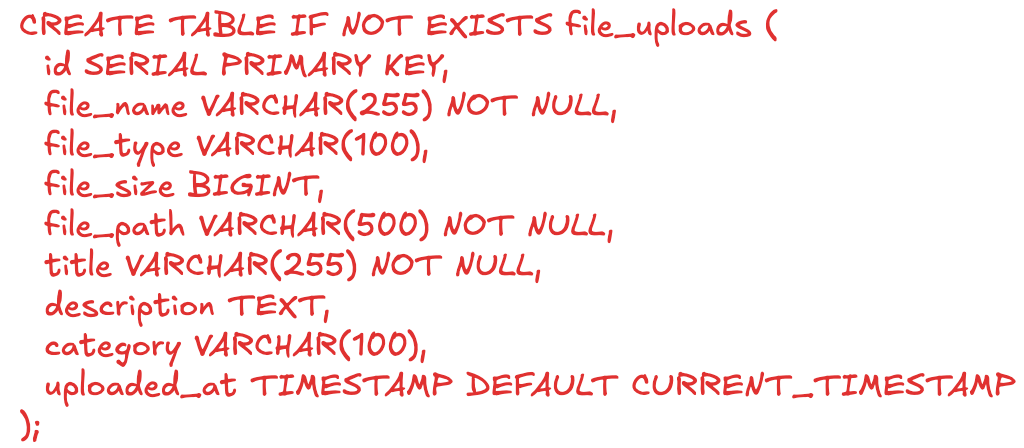
Unlike the previous approach, the file upload becomes a two step process:
Store metadata and generate a pre-signed URL.
Upload file content directly to object storage using that pre-signed URL.
The diagram below illustrates the process and the architecture.
Here’s how this solution overcomes the challenges of the naive approach:
Database performance - The database doesn’t store binary content. Since the metadata size for each record is less than 100 KBs, it can easily scale to millions of records without any performance impact.
Backend server performance - Files are served directly from blob storage, bypassing the backend entirely. This prevents Out of Memory errors ensuring high availability.
Database constraints - The blob storage doesn’t impose specific limits and can scale to handle terabytes of data.
Database backup and replication - Backups and replication are faster since large files are excluded.
Cost efficiency - Storing data in a blob storage is significantly cheaper than storing in a database. This significantly reduces the application costs.
While this solution is efficient and scalable, it has the following downsides:
Eventual consistency: Metadata and file content are stored separately, requiring reconciliation.
Operational complexity: Multi-step uploads and failure handling (e.g., retries, cleanup) must be managed.
Dual backups: Both database and object storage must be maintained reliably.
However, the above trade-offs are acceptable given its scalability benefits.
Food for thought - How do you handle file upload failures while using blob storage? 🤔 (Leave your thoughts in the comments)
Now that you know two solutions exist, how do you choose between the two while solving real-world problems?
Let’s now walk through a few real-world scenarios and understand the suitable approach with the reasoning for each.
Real-world scenarios
Financial transactions and receipts
Financial transactions store the receipts in the form of pdf or image files. They also require strong atomicity guarantees.
For example: The system must generate receipt immediately after receiving the amount and persist it. A multi-step process involving a blob storage upload is not ACID compliant and requires separate reconciliation pipeline for eventual consistency.
Relational databases provide strong consistency out of the box. This makes them appropriate for use cases like storing invoices, receipts, signed tax forms, etc.
Social media assets
Storing billions of files in a database isn’t practical for social media companies like WhatsApp, Instagram, X, etc. They prefer to keep the media files such as images, videos and gifs in blob storage than the database.
Blob storage allows users to store large files (> 100 MB) through multi-part uploads. Similarly, the direct CDN integration and caching improves read performance.
Configuration files
Software development teams keep YAML, XML and other small configuration files in the database. Unlike social media assets, these files are not viewed frequently on a UI and only read once by the application during the startup.
Secure/controlled access environments
For strict security and regulatory compliance, defense or government systems store files in databases that provide built-in encryption, access control, and audit logging.
Conclusion
We learnt that there’s no one size fits all solution for storing files. Each problem is unique with its own constraints.
The below table provides a framework to choose between the two approaches based on the different quality attributes.
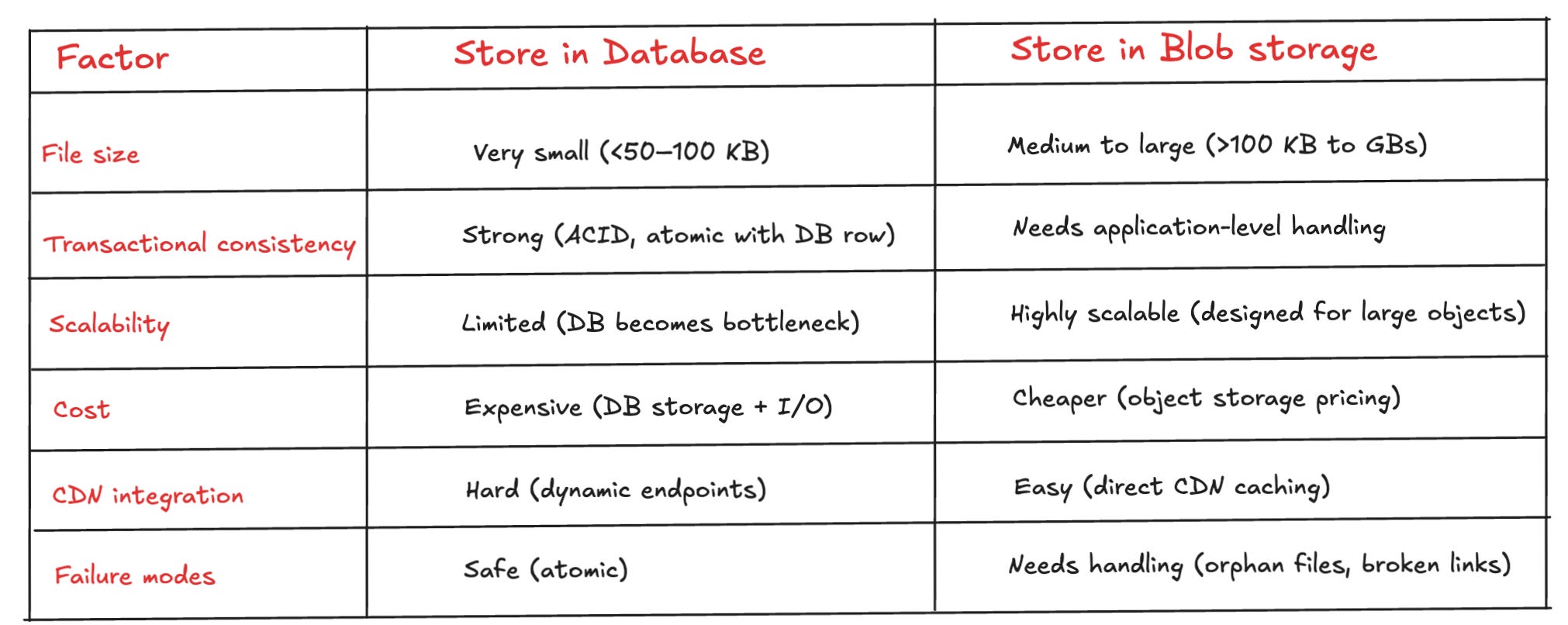
If your system prioritizes strong consistency, simplicity, and small file sizes, storing files directly in the database can be the right decision.
But if you need scalability, high-throughput and cost-efficiency, blob storage becomes the most robust and future-proof choice.
Many companies often adopt a hybrid approach - using databases for critical, tightly coupled data and object storage for large, scalable assets.
This helps companies get best of both worlds rather than constraining to one pattern.
The key is to decide based on the first principles: data size, access patterns, consistency guarantees, and operational complexity—not just convention.
What approach are you using today—database or object storage? 🤔 And what trade-offs have you run into? Leave your thoughts in the comments below.
Before you go:
❤️ the story and follow the newsletter for more such articles
Your support helps keep this newsletter free and fuels future content. Consider a small donation to show your appreciation here - Paypal Donate